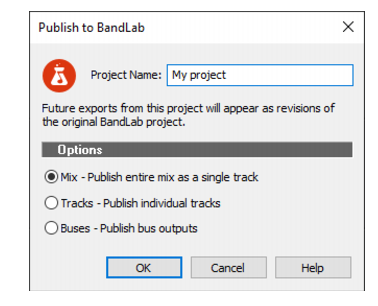
If you use the free BandLab social music service, Cakewalk lets you easily mix down and export the current project directly to BandLab.
1. In the Control Bar’s Export module, select either Project or Selection to specify if you want to publish the entire project, or only selected clips and tracks.If you want to publish individual tracks or buses, and the project contains more than 12 tracks or buses, you must select Selection and manually select the tracks or buses you want to export.
2.
![]()
Project Name. Specify the name of the project as you want it to appear in BandLab. By default, the name is inherited from the Cakewalk project name.
![]()
Mix. Publish the entire mix as a single track.
![]()
Tracks. Publish individual tracks, up to a maximum of 12 tracks. If the project contains more than 12 tracks, you must select Selection in the Export module and manually select the tracks you want to export.
![]()
Buses. Publish bus outputs, up to a maximum of 12 buses. If the project contains more than 12 buses, you must select Selection in the Export module and manually select the buses you want to export, along with the audio tracks that feed the buses. For details, see Bus selection and Select tracks/buses that are assigned to a specific bus.
4. Click OK.The project is exported to the C:\Users\<user name>\Documents\BandLab\Uploads folder. BandLab Assistant (see BandLab Assistant) detects any new or updated folder and files, and automatically uploads them to your BandLab library.
Tip - Searching Documentation
Tip: To search for a specific topic, type your search query in the Search Cakewalk.com field at the top right of this page.
When the search results appear, click which product's documentation you would like to search to filter the search results further.
Note - Using Offline Help
Note: If you prefer to always use offline Help, go to Edit > Preferences > File > Advanced in your Cakewalk software and select Always Use Offline Help.
If you are not connected to the internet, your Cakewalk software will default to showing offline help until an internet connection becomes available.