
|

|

|

|
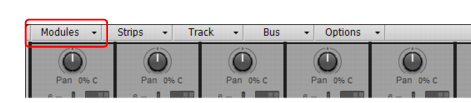
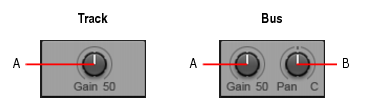
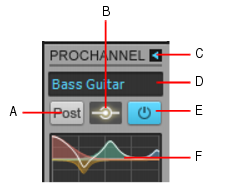
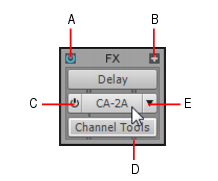
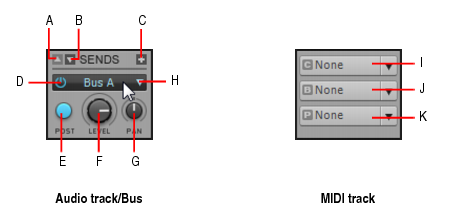
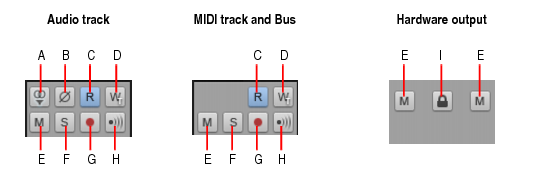
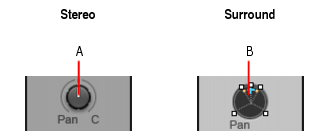
Click the Modules menu in the Console view and choose the desired module.Figure 1186. Input Gain module.A. Input gain/trim B. Input panFigure 1187. ProChannel module.A. Pre/Post B. Global input meter C. Expand/collapse ProChannel D. Preset E. Global On/Off F. Equalizer graphFigure 1188. FX Rack module.A. Bypass FX Rack B. Insert plug-in C. Enable/disable plug-in D. Effect output interleave indicator (mono, stereo or surround) E. Plug-in nameThe Sends / Bank / Patch module provides different controls for audio tracks, buses and MIDI tracks.Figure 1189. Sends / Bank / Patch module.A. Scroll up B. Scroll down C. Insert Send D. Send enable/disable E. Pre/post toggle F. Send level G. Send pan H. Send destination I. Channel J. Bank K. PatchFor information about using sends and MIDI Bank, Patch and Channel settings, see Routing and mixing digital audio and Choosing the instrument sound (bank and patch).Figure 1190. MSR module.A. Mono/Stereo B. Phase Invert C. Read Automation D. Write Automation E. Mute F. Solo G. Arm for recording H. Input Echo I. Link left and right channel faders (hardware outputs only)Figure 1191. Pan Control module.A. Stereo Pan control B. Surround Panner
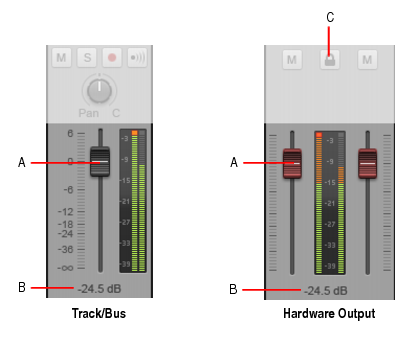

 . This allows you to adjust both the left and right channel at the same time.
Tip - Searching Documentation
Tip: To search for a specific topic, type your search query in the Search Cakewalk.com field at the top right of this page.
When the search results appear, click which product's documentation you would like to search to filter the search results further.
Note - Using Offline Help
Note: If you prefer to always use offline Help, go to Edit > Preferences > File > Advanced in your Cakewalk software and select Always Use Offline Help.
If you are not connected to the internet, your Cakewalk software will default to showing offline help until an internet connection becomes available.